Grade Calculator — Free EZ Grader for Teachers & Students
Enter the number of questions and wrong answers to see the score, percentage and letter grade instantly — with a full grading chart.
Tip for teachers: press W to mark a wrong answer and R to reset for the next test.
Have a different question? Jump straight to the right tool:
How This Free Grading Calculator Helps Teachers and Students Save Time
Marking a stack of tests by hand means doing the same division problem over and over — this grading calculator does it instantly instead. Teachers get through an entire class set in minutes, while students get an immediate, accurate answer without waiting for grades to be posted.
Because it works for any test length and any number of wrong answers, the same grading calculator fits quizzes, chapter tests and full exams equally well — no separate tool needed for different class sizes.
How to Use This Grade Calculator
The tool is built around the way people actually check scores: two numbers in, everything out. Here is the whole process:
- Enter the number of questions on the test, quiz or exam.
- Enter the number of wrong answers — or tap +1 Wrong while you mark, and the score updates live.
- Read the result instantly: score, percentage and letter grade. Turn on the chart to see every possible score at once, then press Reset Wrong and grade the next paper.
What Is a Grade Calculator?
A grade calculator is a free online tool that converts a test score into a percentage and a letter grade in seconds. Instead of dividing correct answers by total questions on paper, you type two numbers and the grade appears instantly.
This grade calculator works as an easy grader for teachers marking a stack of tests, and as a quick score checker for students who want to know exactly where they stand. It replaces the classic plastic EZ grader wheel with something faster that also shows a complete grading chart for any test length.
The same two inputs cover almost every everyday grading situation: quizzes, chapter tests, homework checks, midterms and finals. Because the math is pure percentage, it doesn't matter whether the subject is algebra or history, or whether the class is 4th grade or college — if a score can be written as correct-out-of-total, this page grades it.
Grade Calculator Formula (How Scores Are Calculated)
Every result on this page comes from one transparent formula — the same percentage method described in grading systems used in education worldwide — nothing is hidden:
Example: you answered 17 out of 20 questions correctly. 17 ÷ 20 = 0.85, and 0.85 × 100 = 85%, which is a solid B on the standard scale below.
One more example, this time from the teacher's side: a 30-question test where a student missed 4. Correct answers are 30 − 4 = 26, so 26 ÷ 30 = 0.8667, which rounds to 86.7% — a B, just one question short of B+ territory. The same math works for any test length, from a 5-question pop quiz to a 200-item final exam.
If your class uses points instead of questions, nothing changes: treat total points as the denominator and earned points as the numerator. A project scored 88 out of 100 points is simply 88%.
Grading Scale Chart (Letter Grades)
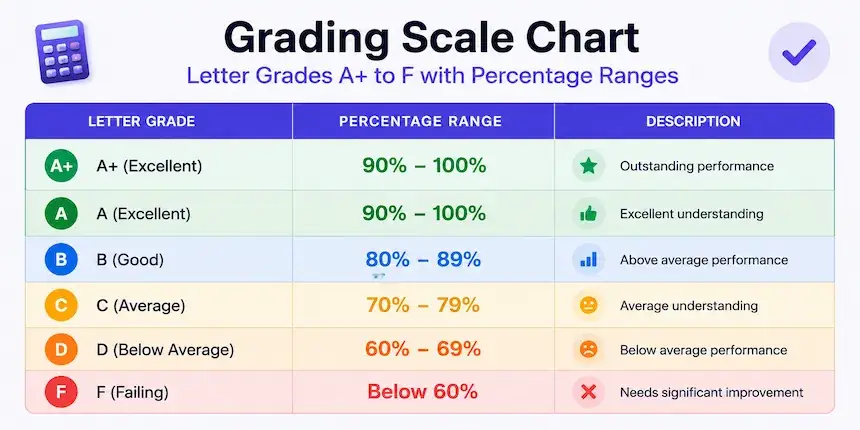
The grade calculator uses the most common US grading scale, shown with matching GPA points (many schools cap A+ at 4.0 rather than 4.3). Schools can vary slightly, so always confirm with your own syllabus or institution.
| Letter Grade | Percentage Range | GPA | Meaning |
|---|---|---|---|
| A+ | 97–100% | 4.3 | Outstanding |
| A | 93–96% | 4.0 | Excellent |
| A− | 90–92% | 3.7 | Excellent |
| B+ | 87–89% | 3.3 | Very good |
| B | 83–86% | 3.0 | Good |
| B− | 80–82% | 2.7 | Good |
| C+ | 77–79% | 2.3 | Satisfactory |
| C | 73–76% | 2.0 | Average |
| C− | 70–72% | 1.7 | Below average |
| D+ | 67–69% | 1.3 | Passing |
| D | 63–66% | 1.0 | Passing |
| D− | 60–62% | 0.7 | Minimum pass |
| F | Below 60% | 0.0 | Failing |
Plenty of schools use a simpler 10-point scale instead — 90–100% is an A, 80–89% a B, 70–79% a C, 60–69% a D, and anything below 60% an F, with no plus or minus steps. Both scales agree on the big picture; the plus/minus system just draws finer lines inside each band. Colleges tend to prefer plus/minus because it feeds directly into GPA steps, while many middle and high schools stay with whole letters for simplicity. If a single percentage point matters for your GPA or eligibility, the syllabus is the final authority, not any online chart.
Scales differ by country. Compare them in our Grading Systems by Country guide.
Grade Calculator for Teachers: Grading a Stack of Tests
Grading a Stack of Tests Fast
Set the number of questions once, then work through the pile: press W for each wrong answer and R to reset between papers. Your hands never leave the keyboard, and the percentage updates as you mark — the fastest way to grade 30 tests in one sitting.
The workflow mirrors how marking actually happens: you don't know the wrong-answer count in advance, you discover it page by page. Tapping +1 Wrong (or pressing W) as you find each mistake means the running score is always on screen, and one press of R clears it for the next student. No wheel to spin, no mental math at 11 pm.
Printable Grading Chart
Turn on Show Grading Chart to see every possible score for your test length — for example, all 21 outcomes of a 20-question quiz — each with its percentage and letter. Prefer a dedicated teacher view with a printable chart? Use our easy grader, built specifically for classroom marking.
Decimals, Rounding and Half Points
A few small controls cover the situations that cause the most grading arguments:
Decimal Precision reveals the exact percentage instead of a rounded one — choose whole numbers, one decimal or two. Useful when a score sits right on a boundary: an 89.5% displays as 89.5%, not 90%, so you can see precisely what a rounding policy would change before anyone assumes the higher letter.
Half Points lets you mark answers half-wrong (0.5 steps), which many teachers use for partially correct work. With it on, the +1 Wrong button and the chart both move in half-point increments.
Grading Scale switches the letters between the standard plus/minus scale and the simpler 10-point scale (90s are As, 80s are Bs) — pick whichever your school uses and every result and chart row follows it.
Show Grading Chart prints every possible outcome for the current test length in one table — handy to pin next to the answer key so the whole class can read their own result.
Grade Calculator for Students: Finals and Weighted Grades
What Do I Need on My Final?
If exams are coming and you're asking "what grade do I need on my final to get an A?", the final grade calculator solves it — enter your current grade, the exam weight and your goal, and it tells you the exact score you need. It also works in reverse: enter the score you expect on the exam and see what your course grade will land on, before results day.
Weighted and Semester Grades
When homework, quizzes and exams count differently, use the weighted grade calculator to combine categories by weight. For quarter and midterm averages across a term, the semester grade calculator handles the standard 40/40/20 setup and any custom split.
A practical tip for exam season: check your standing before the final, not after. Knowing that you need, say, a 78% on the exam to keep a B changes how you plan your study week — and knowing you'd need 104% tells you to talk to your teacher about extra credit now rather than later.
Common Test Lengths: Quick Answers
A few scores come up constantly, so here are the ones people ask about most. On a 20-question test, 18 correct is 90% (A−) and 15 correct is 75% (C). Out of 30, a 26 lands at 86.7% (B) and a 23 at 76.7% (C+). Out of 50, a 45 is a clean 90% (A−), while 40 correct gives 80% (B−). Out of 15, a 12 works out to 80% (B−), and out of 25, a 22 is 88% (B+). Spelling tests and weekly quizzes cluster around 10 to 25 questions, unit tests around 30 to 50, and standardized practice sets often run to 100 — which is why those denominators dominate what people look up. For any combination beyond these, type it into the grade calculator above or open the grading chart to see the full table for your test length in one view.
Accuracy and Privacy
Everything in this grade calculator is computed in your browser using the formula shown above — no scores are sent anywhere, nothing is stored, and there is no sign-up. The letter grades follow the standard scale in the chart, and every number is reproducible by hand, so teachers can verify any result in seconds. Because grading policies differ between schools, treat the letters as the common convention and your institution's syllabus as the final word.
More Grade Calculators
Each of these tools runs on the same transparent math as this page, shows its formula, and works free on any phone, tablet or computer.
Frequently Asked Questions

Michael builds free, transparent calculators for teachers and students. Every tool on this site shows its formula so any result can be verified by hand — no black boxes, no sign-ups, no tricks.
Every grading scale and formula on this page is checked against standard US grading conventions before publishing, and updated whenever a tool's logic changes.