Class Grade Calculator
See your current grade in a class from weighted categories, or find out exactly what score you need on what's left to pass.
If your class is split into separate marking periods, the Quarter Grade Calculator or Semester Grade Calculator may match your syllabus more closely.
What Is a Class Grade Calculator?
A class grade calculator combines your grades across every category in a course — homework, quizzes, tests, and the final exam — weighted by how much each one counts, to show your current standing in that class. Unlike a calculator scoped to a single quarter or a single test, this tool covers the whole course as one running total.
This class grade calculator also answers a different, very common question: if you're worried about failing, the "What I Need to Pass" tab tells you exactly what score you need on everything left in the class to reach a passing grade.
Enter your categories once and the class grade calculator keeps your running total up to date as new grades come in.
If you searched for a class grades calculator, this tool does the same job for every class you take.
Standard Grading Scale for Class Grades
Once your class percentage is calculated, match it against your school's grading scale. Most U.S. schools use this baseline:
| Percentage | Letter Grade |
|---|---|
| 90–100% | A |
| 80–89% | B |
| 70–79% | C |
| 60–69% | D |
| Below 60% | F |
Once the class grade calculator gives you a percentage, find it in this table to see your letter grade.
Example: What Do I Need to Pass?
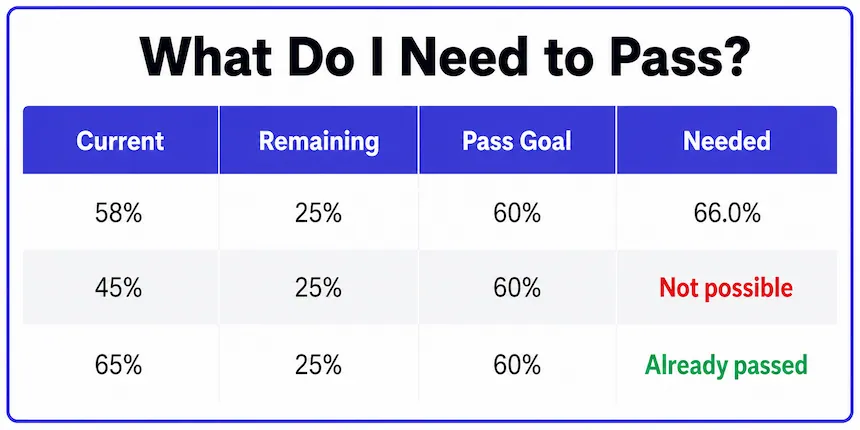
Say your current grade is 58%, you have 25% of your grade left (a final project and the final exam combined), and you need a 60% to pass the class. The class grade calculator solves for the score you need on that remaining 25%.
Try the same numbers in the class grade calculator above to check the result.
| Current Grade | Remaining Weight | Pass Grade | Score Needed |
|---|---|---|---|
| 58% | 25% | 60% | 66.0% |
| 45% | 25% | 60% | 105.0% (Not possible) |
| 65% | 25% | 60% | Already passed |
The lower your current grade and the less weight remains, the higher the score you need on what's left — and past a certain point, no score on the remaining work can save the class. The class grade calculator flags that "not possible" case clearly so you know where you actually stand.
Common Category Weights by Class Type
Not sure what weight to enter for each category? These are common starting points if your syllabus doesn't spell out exact percentages — always double-check against your own class first.
Enter these weights into the class grade calculator, then adjust them to match your syllabus.
| Class Type | Typical Category Breakdown |
|---|---|
| High school class | Homework 15% · Quizzes 20% · Tests 45% · Final 20% |
| College lecture class | Homework 10% · Midterms 40% · Final Exam 30% · Participation 20% |
| College lab/discussion class | Labs 30% · Reports 30% · Participation 20% · Final 20% |
These figures are typical patterns, not fixed rules — every instructor sets their own weights, so treat this table as a rough starting point rather than something to enter blindly. If your syllabus lists a category this table doesn't cover, like attendance or lab notebooks, just add it as its own row with whatever weight your instructor assigned.
A class grade calculator gives accurate results only when the weights match your syllabus.
Class Grade Calculator vs. Quarter, Midterm, and Semester
This class grade calculator is built for the whole course as a single running total — not scoped to one marking period. If your course is broken into separate quarters, the Quarter Grade Calculator handles one period at a time. If you're checking your standing partway through before a final exam, the Midterm Grade Calculator is built around that specific two-part structure. If your school combines quarters, a midterm, and a final exam into one number, the Semester Grade Calculator covers that fuller combination.
For more on how weighted category grading works generally, MSU Denver's CTLD resource on weighted grading breaks down the underlying math, and Wikipedia's overview of U.S. academic grading covers how these percentages map to letter grades and passing thresholds more broadly.
In short, to calculate your grade in class, enter each category's grade and weight into the class grade calculator at the top of this page.
Frequently Asked Questions
Most U.S. schools set the passing threshold at 60%, though some require higher. Switch to the "What I Need to Pass" tab above, enter your current grade and how much weight is left, and the class grade calculator tells you exactly what score you need on the rest.
Enter each category — homework, quizzes, tests, and so on — with its grade and weight in the "My Class Grade" tab above. The class grade calculator combines them into your current overall percentage and letter grade. Only enter finished categories, and the result reflects the work completed so far.
Multiply each category's average by its weight, then add the results. For example, homework at 90% (20% weight), quizzes at 80% (30%), and tests at 85% (50%) give 18 + 24 + 42.5 = 84.5%. Enter your categories from your syllabus above and the class grade calculator does this for you.
Yes — just leave that category's row blank or remove it, and enter the weights for the categories you do have grades for. Keep in mind your result will only reflect the completed portion of the class, not the full course.
If even a perfect score on everything remaining wouldn't reach your passing grade, the calculator will show "Not possible" along with the best final grade you could realistically still achieve.
It should, as long as the categories and weights you enter exactly match your syllabus. If the numbers don't match, double-check whether your school rounds differently or includes a category you left out, like participation or extra credit. It's also worth confirming that your school hasn't dropped a low score or applied a curve somewhere in the calculation, since either of those would shift the final number without changing the raw category grades themselves.

Michael builds free, transparent calculators for teachers and students. Every tool on this site shows its formula so any result can be verified by hand — no black boxes, no sign-ups, no tricks.
Every grading scale and formula on this page is checked against standard US grading conventions before publishing, and updated whenever a tool's logic changes.