Grade Average Calculator
Average any list of scores — a simple unweighted mean, or a weighted average if some scores count more than others.
Not sure which one you need for your grade average calculator? If every score counts equally, use Simple Average. If some categories — like tests or finals — count more than others, use Weighted Average.
What Is a Grade Average Calculator?
A grade average calculator takes a list of scores and combines them into a single number — either a simple average, where every score counts the same, or a weighted average, where some scores count more than others. It's the most basic building block behind almost every other grade calculation: quarter grades, class grades, and course grades are all, at their core, some form of averaging — this grade average calculator is simply the most direct, general-purpose version of that math.
This grade average calculator covers both cases. If every quiz, test, or assignment counts equally, the Simple Average tab does straightforward arithmetic. If your tests count more than your homework, the Weighted Average tab factors that in. Either way, you can add or remove rows freely as you enter more scores throughout the term, so the tool stays useful from the first assignment through the last. Students use a grade average calculator like this one to check their progress before report cards come out.
Standard Grading Scale for Grade Averages
After the grade average calculator gives you a percentage, match it against your school's grading scale. Most U.S. schools use this baseline:
| Percentage | Letter Grade |
|---|---|
| 90–100% | A |
| 80–89% | B |
| 70–79% | C |
| 60–69% | D |
| Below 60% | F |
Example: Simple vs. Weighted Average
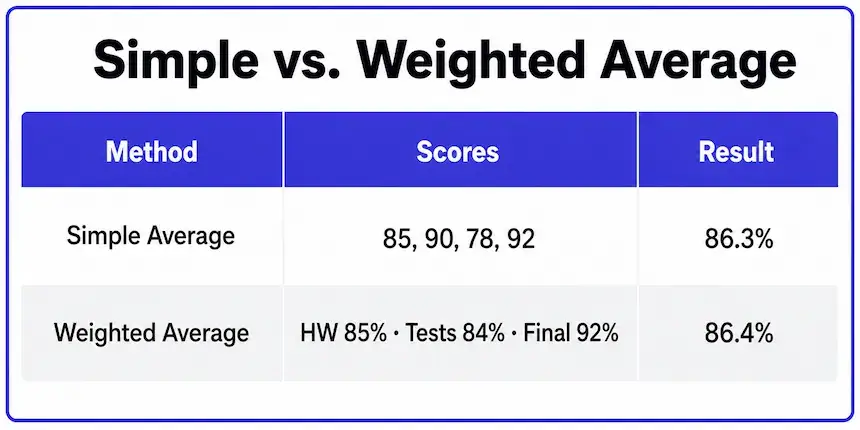
Say you have four scores: 85%, 90%, 78%, and 92%. A simple average treats them all equally. But if two of those scores are tests worth more than the others, a weighted average gives a different — often more accurate — result.
| Method | Scores | Result |
|---|---|---|
| Simple Average | 85, 90, 78, 92 (equal weight) | 86.3% |
| Weighted Average | Homework 85% (20%), Tests 84% (50%), Final 92% (30%) | 86.4% |
The two methods can land close together or far apart depending on how spread out the underlying scores are and how the weights are distributed — the grade average calculator above handles both so you can check which one matches how your class is actually graded. Every grade average calculator relies on the same two formulas shown above.
When to Use Simple vs. Weighted Averaging
Not sure which tab to use in the grade average calculator? Check your syllabus for how your teacher describes the grading breakdown — the language usually tells you which method applies.
| Syllabus Language | Use This Tab |
|---|---|
| "Each assignment is worth the same" | Simple Average |
| "Tests are worth 50%, homework 20%..." | Weighted Average |
| No categories mentioned, just a list of scores | Simple Average |
| Percentages listed next to each category name | Weighted Average |
If your syllabus doesn't specify either way, it's most likely a simple average — weighted grading is almost always explicitly stated because it changes how much each category matters. When in doubt, try both tabs and compare the results; if they land close together, either interpretation is probably safe to use. If both tabs agree, the grade average calculator result is safe to trust.
How to Calculate Your Grade Average
Knowing how to calculate grade average by hand helps you check any result. Add up all your scores, then divide by the number of scores. For 85, 90, 78 and 92, the total is 345, and 345 ÷ 4 = 86.25%. The grade average calculator above does this instantly.
Here is how to calculate the average of your grades when categories carry different weights. Multiply each category score by its weight, add the results, then divide by the total weight. Our average grade calculator handles both steps, so you only enter scores and percentages.
Use this grade average calculator whenever a new score is posted. Add a new row, press Calculate Average, and compare the result with your last one. Because the grade average calculator keeps every row, you can also test a future score by entering a guess for your next test.
Grade Average Calculator vs. Other Tools
Think of this grade average calculator as the starting point; the other tools add context. This grade average calculator is the general-purpose version — no time period, no pass/fail framing, just averaging. If you want your standing at a specific point in the term, the Midterm Grade Calculator or Quarter Grade Calculator are scoped more narrowly. If you're checking whether you'll pass a class, the Class Grade Calculator has a dedicated "What I Need to Pass" mode built in.
For background on how weighted averaging works across these tools, MSU Denver's CTLD resource on weighted grading explains the underlying math, and Wikipedia's overview of U.S. academic grading covers how these averaged percentages typically map to letter grades.
Frequently Asked Questions
Enter your scores into the Simple Average tab above, or your weighted categories into the Weighted Average tab if some scores count more than others. This grade average calculator returns your percentage and letter grade instantly, and you can rerun it as many times as you like as new scores come in throughout the term.
Add up all your scores and divide by how many there are for a simple average, or multiply each score by its weight and divide by total weight for a weighted average. Either way, the calculator above does the math automatically.
Add a new row with that hypothetical score in the Simple Average tab and recalculate — this lets you see how one more test or assignment would shift your overall average before it actually happens, which is useful for deciding how much a final assignment really needs to matter.
A grade average is a percentage or letter grade combining scores within a single class. A GPA is a different calculation entirely — it combines final grades across multiple classes, usually converted to a 4.0 scale, and isn't something this calculator covers.
Multiply each category's grade by its weight (as a decimal), add all the results together, then divide by the total weight. For example, an 85% worth 40% weight contributes 34.0 to the total before dividing.
It depends on how many scores you're averaging and how much weight that score carries. One low score among many equally-weighted ones has a small impact; one low score in a heavily weighted category can shift the average more significantly. Try removing or adjusting it in the calculator above to see the difference.
Add every score, then divide by how many scores you have. For 88, 92 and 75, the total is 255 and 255 ÷ 3 = 85%. For weighted grades, multiply each score by its weight first. Any grade average calculator automates this, including this one.
Add a new row, enter the score you expect, and press Calculate Average. Searching for an if my grade average calculator? This works as one: change the guess to see best and worst cases. With 85, 90 and 78, a 92 lifts the average from 84.3% to 86.3%.

Michael builds free, transparent calculators for teachers and students. Every tool on this site shows its formula so any result can be verified by hand — no black boxes, no sign-ups, no tricks.
Every grading scale and formula on this page is checked against standard US grading conventions before publishing, and updated whenever a tool's logic changes.