Easy Grader — Free Online EZ Grader Chart for Teachers
The classic EZ Grader wheel, online — enter the number of questions and wrong answers to get an instant score, percentage and letter grade for every paper in the stack.
Tip for teachers: press W to mark a wrong answer and R to reset for the next test.
Have a different question? Jump straight to the right tool:
How to Use the Easy Grader
This tool is built for one job: grading a pile of papers as fast as possible. The routine takes seconds per test:
- Set the number of questions once — it stays put for the whole stack.
- Mark wrong answers with the +1 Wrong button, or press W on your keyboard as you find each mistake.
- Read the grade from the big display or the chart, write it on the paper, press R, and pull the next test off the pile.
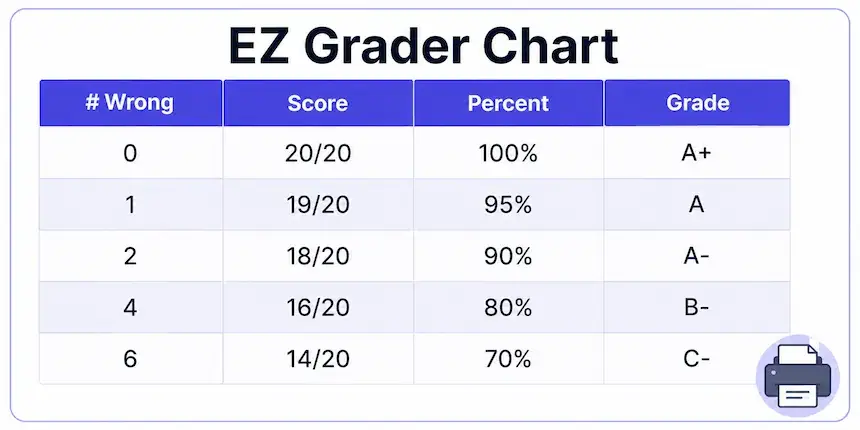
The grading chart stays open by default so the whole class scale is visible at a glance — every possible score, its percentage, and its letter, updated live whenever the question count changes.
What Is an Easy Grader?
An easy grader is a scoring tool that converts wrong-answer counts into percentages and letter grades instantly, so teachers never have to divide on paper between tests. Enter how many questions the test has, mark how many a student missed, and the grade appears.
The name comes from the classic handheld "E-Z Grader" — the sliding cardboard wheel that generations of teachers kept in their desk drawer. This page does the same job in the browser, with three upgrades the wheel never had: it handles any test length up to 500 questions, it shows decimals when you need exact scores, and it prints a fresh chart for any quiz in one click.
The EZ Grader Chart
The chart is the heart of this tool. For the test length you set, it lists every possible outcome in four columns: number wrong, score, percentage, and letter grade — effectively a custom answer key for that quiz. A 20-question test produces 21 rows; switch to a 35-question unit test and the chart rebuilds itself instantly.
Need one row out of fifty? Type into Search the Chart — "7 wrong" or a letter like "B" — and the matching rows highlight instantly. Press 🖨 Print Chart and only the chart goes to the printer — no buttons, no page furniture — sized cleanly for a sheet you can tape beside your answer key or hand to a co-teacher. Teachers who grade the same quiz length every week keep one printed copy per format and stop retyping entirely.
Letter grades follow the standard US scale (90s are As, 80s are Bs, and so on, with plus/minus steps). Since districts differ, the academic grading conventions in the United States are worth a skim if your school's scale has quirks — and your own syllabus always wins.
Grading a Stack of Tests Fast
Speed grading is a rhythm: eyes on the paper, fingers on the keyboard. With W marking each wrong answer and R resetting between papers, your hands never leave home row and the running score is always on screen. Thirty tests that used to take an evening compress into the time between two cups of tea.
Real classrooms lose serious hours to marking — teacher-workload surveys consistently show grading among the biggest out-of-class time costs. A tool can't mark essays for you, but for objective quizzes, spelling tests and homework checks, it removes every second of arithmetic.
Online EZ Grader vs the Plastic Wheel
If you learned to grade with the cardboard slide-rule version, everything here will feel familiar — just faster. The wheel maxes out around 95 questions; this handles 500. The wheel shows one score at a time; the chart shows all of them. The wheel can't do half credit; the half-points toggle can. And the wheel costs money and goes missing before finals week, while this stays free in any browser on any device, including the phone in your pocket during carpool duty.
The one thing the wheel had going for it was zero setup — and that survives here too: no account, no app install, nothing to configure. Bookmark the page and it opens ready to work, with your last-used layout intact for the session. If your school blocks unknown sites, the page is also light enough to load over the slowest staff-room Wi-Fi without complaint.
Half Points and Decimals
Turn on Half Points to mark answers as partially correct — the +1 Wrong button then steps by 0.5, and the chart rebuilds in half-point rows, which is exactly how many teachers score multi-part questions. Turn on Show Decimals when a grade sits near a boundary: an 89.5% shows as 89.5%, not 90%, so rounding decisions stay in your hands, not the tool's.
Common Quiz Sizes in Real Classrooms
Most marking falls into a handful of formats, and the chart handles each in one setting. Weekly spelling tests usually run 10 to 20 words — on a 15-word list, one wrong is 93.3% (A) and three wrong is 80% (B−). Chapter quizzes cluster around 20 to 25 questions, where the pass line of 60% means 12 correct out of 20. Unit tests stretch to 30 or 50 items; out of 50, a student can miss 5 and still hold an A− at 90%. Scantron-style finals often hit 100, where the math turns trivially clean — every question is exactly one percent. Whatever the format, set the number once and the entire stack grades to the same scale.
For multi-part questions worth several points each, treat total points as the question count: a 40-point test with 33 points earned reads as 33/40 = 82.5% (B−), the same arithmetic in different clothes.
Who Is It For?
Teachers are the main audience — but not the only one. Homeschooling parents use it as their daily scorer, tutors use the printed chart during sessions, and students use it to check their own returned tests. For grades that combine categories or exams, the site's other tools pick up where this one stops.
More Free Grading Calculators
Every tool runs on transparent math, shows its formula, and is free on any device.
Frequently Asked Questions

Michael builds free, transparent calculators for teachers and students. Every tool on this site shows its formula so any result can be verified by hand — no black boxes, no sign-ups, no tricks.
Every grading scale and formula on this page is checked against standard US grading conventions before publishing, and updated whenever a tool's logic changes.