About GradeCalculator360
Welcome to GradeCalculator360. This About-GradeCalculator360 page explains our website's purpose and introduces the free online grade calculators available here. We help students, teachers, parents, and tutors work through common academic calculations. Whether you are checking a quiz score, estimating a final exam result, or working with a grading scale, our goal is to make grade calculations clearer and easier to understand.
A useful calculator should do more than display a number. It should help you understand what information to enter and how the result relates to your scores. About-GradeCalculator360 also explains why checking your inputs and understanding the calculation method matter. We aim to make everyday grade calculations more accessible, so you can check results without doing every calculation by hand.
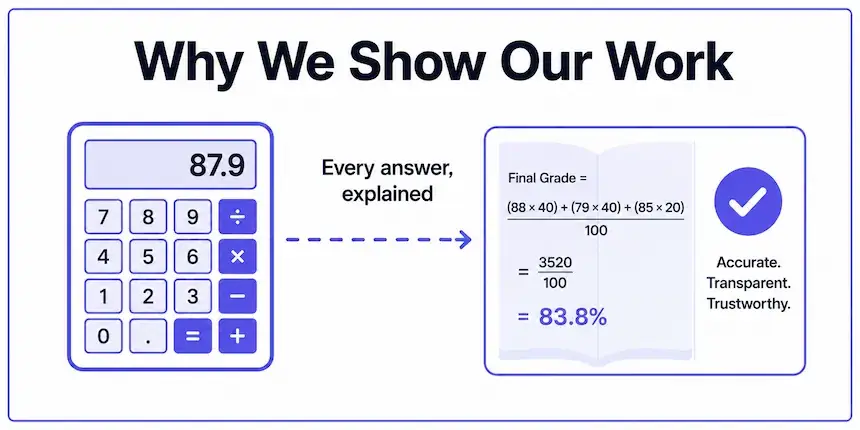
Clear calculation methods help users understand and check their results.
About-GradeCalculator360: Our Mission
Our mission is to make common grade calculations simpler and easier to follow. A student may want to understand one test result, a teacher may need to calculate several scores, and a parent may be helping with homework. Our aim is to provide practical tools that make these everyday tasks easier.
We recognise that grading rules differ between schools, colleges, courses, and examinations. Understanding the method behind a result is important, especially when weighted assignments, grading scales, or special course policies affect the final calculation. This is an important part of the information presented on About-GradeCalculator360.
What You Can Do With Our Grade Calculators
GradeCalculator360 offers tools for common academic calculations. Depending on the calculator, you can use the site to:
- Convert points earned into a test percentage.
- Check a score against a grading scale.
- Calculate an average from multiple grades.
- Combine assignment grades using category weights.
- Estimate the score needed to reach a target final grade.
Choose the calculator that matches your task and enter the requested information. For important academic decisions, compare the result with your school's grading policy and course instructions. About-GradeCalculator360 is intended to help visitors understand the available tools, not to replace official academic guidance.
How Grade Calculations Work
One common way to calculate a test percentage is to divide the points earned by the total possible points and multiply by 100. This basic method is useful when all points count equally.
Percentage = (Points Earned ÷ Total Possible Points) × 100
Example: If you earn 42 points out of 50, your percentage is 42 ÷ 50 × 100 = 84%.
Weighted grades require additional information because each assignment or category contributes according to its assigned weight. The correct calculation depends on the grading method used by your course. Before relying on a result, check that the selected calculator matches your grading system.
Grading scales, rounding policies, extra credit, dropped assignments, and final-exam rules can vary. A calculated percentage therefore does not always determine an official letter grade or final course result. These limitations are important when using the tools described on About-GradeCalculator360.
Our Approach to Clarity and Accuracy
We aim to make our calculators understandable and practical to use. Clear inputs, meaningful results, and explanations of calculation methods can help visitors understand what a result represents. About-GradeCalculator360 explains this approach so visitors can make informed use of the tools.
When using a grade calculator, we recommend that you:
- Check that the scores and total possible points are correct.
- Enter the weights and grading scale that apply to your course.
- Read the instructions provided on the relevant calculator page.
- Confirm important results against your school's official records.
Our calculators are intended as educational tools for checking and estimating results. They do not replace an instructor's gradebook, an institution's grading policy, or an official academic record. Results depend on the information entered and the method used by the selected calculator.
Find the Right Grade Calculator
About-GradeCalculator360 helps visitors find the appropriate calculator for their needs. Start with the tool that best matches the calculation you want to perform.
| Calculator | What it helps you do |
|---|---|
| Grade Calculator | Calculate a score or percentage using the available settings. |
| Easy Grader | Check test results using the number of questions and incorrect answers. |
| Final Grade Calculator | Estimate a final grade or the score needed to reach a target. |
| Weighted Grade Calculator | Calculate grades when assignments or categories have different weights. |
| Grade Average Calculator | Calculate an average from multiple grades. |
Who Can Use GradeCalculator360?
- Students: Check test scores, grade averages, and possible final results.
- Teachers: Calculate test results and review grading outcomes.
- Parents and tutors: Help learners understand percentages, scores, and grades.
Because grading systems differ, always check your course instructions when a calculation depends on a particular school's rules. The aim of About-GradeCalculator360 is to explain our tools and help visitors understand their appropriate use.
How We Improve the Site
GradeCalculator360 is intended to be a practical resource that can improve over time. Clear instructions, useful tools, understandable calculation methods, and visitor feedback can help identify where a calculator or explanation may need clarification.
If you notice a possible calculation issue, please tell us which calculator you used and describe the problem. Avoid including private student records or other sensitive personal information.
You can send feedback through our Contact page.
For broader guidance on creating useful, trustworthy website content, you can also read Google's guidance on helpful, reliable, people-first content.
Frequently Asked Questions
What is About-GradeCalculator360?
About-GradeCalculator360 introduces GradeCalculator360, its purpose, and its online tools for common grade calculations, including test scores, averages, weighted grades, and final-grade estimates.
Are GradeCalculator360 calculators free to use?
The calculators linked on this page are presented as free online tools. Open the calculator you need to review its available features and instructions.
How does a grade calculator calculate a percentage?
For a basic points-based percentage, divide the points earned by the total possible points and multiply by 100. For example, 42 points out of 50 equals 84%. Weighted grades require a calculation that also accounts for the assigned weights.
Can I use a grade calculator for my official school grade?
You can use a calculator to estimate or check a result, but follow your school's grading scale, rounding policy, syllabus, and official grade records. Results may differ if your institution uses rules that are not reflected in the calculator.
What should I do if a calculator result looks incorrect?
Check the scores, totals, weights, and grading scale you entered. Then review the instructions on that calculator's page. If the result still appears incorrect, use our Contact page to describe the issue. Do not share private academic records or sensitive personal data.
Our Commitment
GradeCalculator360 aims to make grade calculations easier to understand through accessible tools, clear explanations, and practical guidance. About-GradeCalculator360 describes our focus on helping visitors understand the information and grading rules that affect their results.
Thank you for using GradeCalculator360. We welcome constructive feedback that helps us make our calculators and explanations more useful.