Quiz Grade Calculator
Grade a single quiz by questions missed or points lost, or average all your quiz scores together to see where you stand across the term.
This quiz grade calculator uses the standard 90/80/70/60 scale by default; check your syllabus if your class uses a different one.
What Is a Quiz Grade Calculator?
A quiz grade calculator turns your quiz results into a percentage and letter grade instantly — either for one quiz by questions missed, or across several quizzes averaged together. Quizzes are usually smaller and more frequent than tests, so this tool is built around quick entry: a handful of questions rather than a long exam, and an easy way to track scores as they add up over the term.
This quiz grade calculator covers both situations. The "This Quiz" tab grades a single quiz the same way as a test — total questions and questions missed. The "Quiz Average" tab lets you enter every quiz score from the term and see your running average.
Standard Grading Scale for Quiz Grades
Once your quiz percentage is calculated, match it against your school's grading scale. Most U.S. schools use this baseline:
| Percentage | Letter Grade |
|---|---|
| 90–100% | A |
| 80–89% | B |
| 70–79% | C |
| 60–69% | D |
| Below 60% | F |
Points Per Question on a Small Quiz
Quizzes are often shorter than tests, which means each question is worth more. Here's a quick reference for common quiz sizes:
| Quiz Size | Each Question Is Worth |
|---|---|
| 5 questions | 20 points (20%) |
| 10 questions | 10 points (10%) |
| 15 questions | 6.7 points (6.7%) |
| 20 questions | 5 points (5%) |
On a short quiz, missing even one or two questions can drop a grade a full letter — worth keeping in mind when a single quiz feels lower-stakes than a test but the math says otherwise. The quiz grade calculator above builds this out automatically for whatever quiz size you enter.
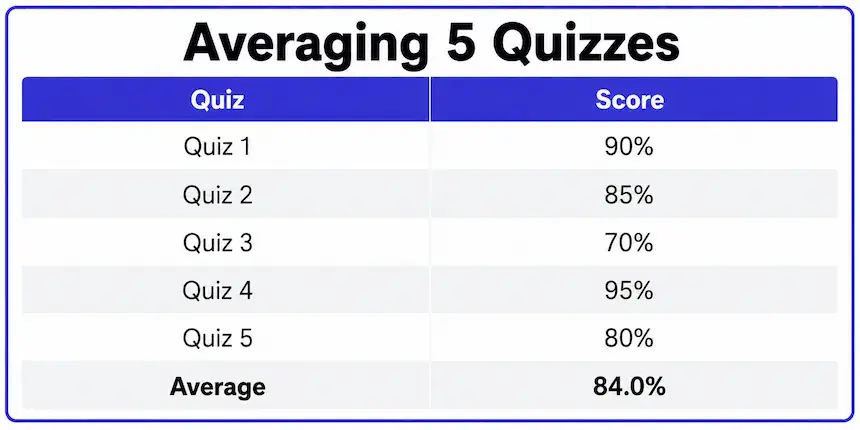
Example: Averaging Multiple Quizzes
Say you've taken five quizzes this term: 90%, 85%, 70%, 95%, and 80%. Adding them together and dividing by five gives your quiz average — this is exactly what the "Quiz Average" tab computes automatically.
| Quiz | Score |
|---|---|
| Quiz 1 | 90% |
| Quiz 2 | 85% |
| Quiz 3 | 70% |
| Quiz 4 | 95% |
| Quiz 5 | 80% |
| Average | 84.0% |
Notice how the one weaker score (70%) pulls the average down, but doesn't dominate it — with five roughly equal scores, no single quiz controls the outcome the way it would if there were only two or three. The more quizzes you have, the less any single low score matters to the overall average, which is part of why many teachers use frequent quizzes instead of a few large tests. It also means a bad week early in the term is easier to recover from than it might feel at the time, since later quizzes carry just as much weight in the running average.
Quiz Grade Calculator vs. Test Grade Calculator
Quizzes and tests use the same underlying math, but this quiz grade calculator adds one thing a single-test tool doesn't need: a running average across many quizzes. If you're grading one longer exam instead, the Test Grade Calculator covers that case directly, including a points-based mode for exams scored by point value rather than question count.
For background on how these percentage-based grades map to letters, Wikipedia's overview of U.S. academic grading covers the standard scale in more depth, and the Wichita State exam grading definitions page explains how a percent score like this differs from a percentile ranking.
Frequently Asked Questions
Subtract the questions you missed from the total, divide by the total, and multiply by 100. The calculator above does this instantly — just enter your total questions and how many you missed, and it handles the rest, including matching the result to a letter grade automatically.
Switch to the "Quiz Average" tab on the quiz grade calculator above and enter each quiz score as its own row. The calculator adds them together and divides by how many quizzes you've entered, giving you a running average across the term that updates instantly every time you add a new score.
It depends on your class. If your syllabus lists "Quizzes" as a single category with one weight, they're likely averaged together and treated as one block. If some quizzes are marked as worth more than others — a chapter quiz counting double a pop quiz, for example — check with your instructor before assuming a simple average applies, since that would call for a weighted approach instead.
The core math is identical — correct answers divided by total, times 100. This tool adds a running-average mode for tracking several quizzes over time, since quizzes tend to be more frequent and lower-stakes than individual tests.
Because quizzes usually have fewer total questions, each one is worth a larger share of the grade. Missing 1 out of 10 questions costs 10 percentage points, while missing 1 out of 50 on a longer test only costs 2. This is worth keeping in mind if a quiz feels casual — the math treats it just as seriously as any other graded assignment.
Yes — enter your existing scores in the Quiz Average tab, then add the new score as another row to see exactly how it shifts your overall average before and after.

Michael builds free, transparent calculators for teachers and students. Every tool on this site shows its formula so any result can be verified by hand — no black boxes, no sign-ups, no tricks.
Every grading scale and formula on this page is checked against standard US grading conventions before publishing, and updated whenever a tool's logic changes.