Weighted Grade Calculator — Grades with Weights
Add your assignments with their grades and weights — the weighted grade calculator shows your weighted average and letter grade instantly.
Weights don't have to total 100 — the weighted grade calculator normalizes automatically and tells you when it does.
Have a different question? Jump straight to the right tool:
How to Use the Weighted Grade Calculator
- Add a row per category or assignment — homework, quizzes, midterm, final, project. Names are optional; the math only needs grades and weights.
- Enter each grade and its weight — the weight is how much that item counts toward your course grade, usually printed in the syllabus.
- Read the result instantly — the weighted grade calculator updates live as you type, showing your weighted average and letter grade. Add a target to see what any remaining work needs to score.
What Is a Weighted Grade?
A weighted grade is a course average where different assignments count by different amounts. A final exam worth 50% moves your grade five times harder than a homework category worth 10% — so a plain average of your scores would give a wrong answer. The weighted grade calculator multiplies each grade by its weight before averaging, which is exactly how teachers' gradebooks compute it.
That's the whole trick: weight decides influence. A 95% on a small quiz feels great but barely moves the needle, while two points on a heavy final can swing a letter grade. Seeing those forces on one screen is what this page is for.
Weighted Grade Calculator Formula
where g = each grade and w = its weight.
Dividing by the total of the weights is what makes the formula forgiving: whether your weights add to 100, 95, or you only know some of them, the weighted grade calculator scales everything correctly — the same standard method described in weighted arithmetic mean mathematics.
Worked Example
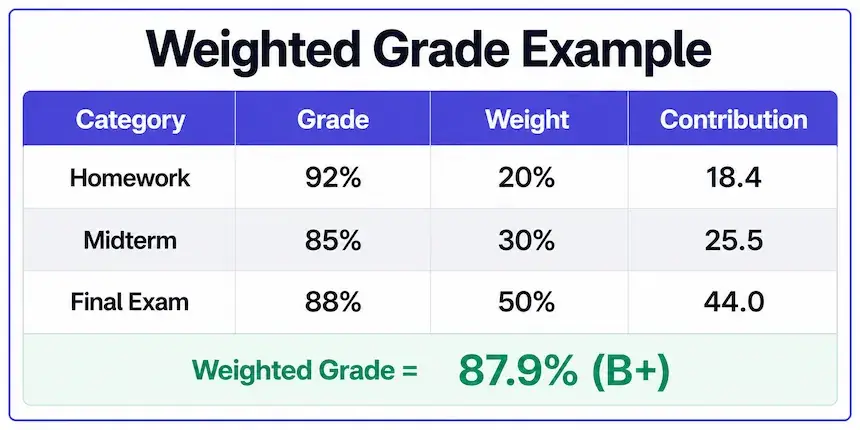
A typical syllabus: homework 20%, midterm 30%, final exam 50%. A student scores 92% on homework, 85% on the midterm, and 88% on the final:
| Category | Grade | Weight | Contribution |
|---|---|---|---|
| Homework | 92% | 20% | 18.4 |
| Midterm | 85% | 30% | 25.5 |
| Final Exam | 88% | 50% | 44.0 |
| Weighted Grade | 87.9% — B+ | ||
Notice the story the contributions tell: the 92% homework — the best score — contributed the least, because it carried the least weight. Press Load example in the weighted grade calculator above to see this exact case live and then swap in your own numbers.
Weighted vs Unweighted Grades
An unweighted average treats every entry equally — add the grades, divide by the count. That's correct only when every assignment genuinely counts the same, which almost never matches a real syllabus. The example above averages to 88.3% unweighted but 87.9% weighted; with more extreme weights the gap grows to full letter grades. Rule of thumb: if your syllabus lists percentages next to categories, you need the weighted grade calculator, not a plain average.
What Do I Need on the Remaining Work?
Enter a target average in the optional field and the tool solves the other direction: given what you've scored so far and the weight still outstanding, it reports the grade your remaining work must average to hit the goal. It's the same logic our final grade calculator applies to a single final exam — here it works for any mix of remaining categories.
Calculating a Final Grade with Weights
The most common weighted question of all: "my final is worth 40% — what happens to my grade?" You can model it right here (one row per category plus a Final row), or jump to the dedicated final-grade tool, which adds goal presets, a dropped-lowest mode and a replacement-policy mode on top of the same weighted math.
Common Weighting Schemes
Syllabi tend to reuse a handful of patterns, and knowing yours makes the numbers intuitive. The classic college split is 20/30/50 (homework, midterm, final) from the worked example. Discussion-heavy courses often run 10/20/30/40 with participation included. Lab sciences favor 25/25/50 across labs, exams and a final. High school courses frequently use 40/40/20 — two quarters plus an exam — which is exactly the structure our semester grade calculator presets. Whatever the scheme, the weighted grade calculator handles it the same way: one row per category, weights straight off the syllabus.
One practical habit worth stealing from top students: rebuild your syllabus in the calculator during week one, with blank grades. From then on, every returned assignment takes ten seconds to enter — and you always know your standing before it's too late to change it.
Where Weighted Grading Shows Up
College syllabi weight categories almost universally, and high school courses increasingly do the same — a shift reflected in the National Principals Association's own guidance on how weighting should be applied consistently across AP, IB and dual-enrollment courses. Canvas, PowerSchool and other gradebooks compute weighted averages the same way this page does, so your result here should match your portal to within rounding. If it doesn't, a hidden policy (dropped scores, extra credit, category caps) is usually the reason — check the syllabus fine print.
More Grade Calculators
Every tool runs on transparent math, shows its formula, and works free on any device.
Frequently Asked Questions

Michael builds free, transparent calculators for teachers and students. Every tool on this site shows its formula so any result can be verified by hand — no black boxes, no sign-ups, no tricks.
Every grading scale and formula on this page is checked against standard US grading conventions before publishing, and updated whenever a tool's logic changes.