Semester Grade Calculator — Midterm & Final Grades
Combine your quarter grades, midterm and final exam with any weights — the semester grade calculator shows your semester average and letter grade instantly.
Leave a grade blank and set a target — the semester grade calculator solves what that period needs to score.
Have a different question? Jump straight to the right tool:
How to Use the Semester Grade Calculator
- Pick your structure — tap a preset (the classic 40/40/20, two equal halves, or 25/25/50) or edit the weights to match your syllabus exactly.
- Enter the grade for each period — quarters, midterm, final exam. The semester grade calculator recalculates live as you type.
- Read your semester average and letter grade — and if the semester isn't over, leave the missing period blank, set a target, and see what that period needs to score.
What Is a Semester Grade?
A semester grade is the single grade a school reports for a term — the number this semester grade calculator produces — built by combining your grading periods — usually two quarters and a final exam — with fixed weights. It's the number that lands on transcripts, drives GPA, and decides eligibility, which is why students search for it the week before report cards more than any other time of year.
The math is a weighted average with a school-flavored twist: the weights are usually standardized district-wide. The semester grade calculator ships with the most common structures built in, and every weight stays editable for the schools that do it differently.
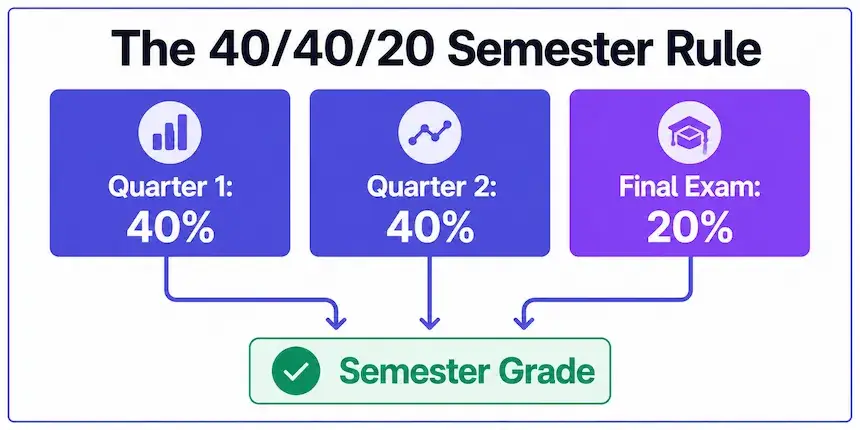
Semester Grade Formula (the 40/40/20 Rule)
— the classic US high school structure; swap the decimals for your school's weights.
Many US districts publish exactly this 40/40/20 split, while others run 45/45/10, 50/50 with no exam, or college-style 25/25/50. The general shape is always the same weighted average described in weighted arithmetic mean math — multiply each period by its share, add them up.
Semester Grade with a Final Exam — Worked Example
A student carries an 88% in Quarter 1, slips to 79% in Quarter 2, and scores 85% on the final exam under 40/40/20 weighting:
| Period | Grade | Weight | Contribution |
|---|---|---|---|
| Quarter 1 | 88% | 40% | 35.2 |
| Quarter 2 | 79% | 40% | 31.6 |
| Final Exam | 85% | 20% | 17.0 |
| Semester Grade | 83.8% — B | ||
Two things worth noticing: the weak quarter hurt exactly as much as the strong one helped, because they weigh the same — and the final exam, at only 20%, could not rescue or ruin the semester alone. Run your own numbers in the semester grade calculator above to see where your term is heading before the report card does.
Midterm Grade Calculator
Mid-semester progress reports use the same machinery with different inputs. To use this semester grade calculator as a midterm grade calculator, enter only the periods completed so far — say Quarter 1 at full weight — and the tool normalizes automatically, telling you your standing right now. Add a target semester grade, and it reports what the remaining quarter and exam must average: the earlier you ask, the easier the answer is to act on.
College midterms work the same way with category weights instead of quarters — for full syllabus structures (homework, quizzes, exams as separate categories), the weighted grade calculator is the better fit, and its result plugs straight back in here.
What Do I Need on My Final to Pass the Semester?
Leave the Final Exam grade blank, enter your quarter grades, set a target — 60% to pass, 80% for a B, 90% for an A — and the semester grade calculator solves the exam score you need. If the answer comes back above 100%, it says so honestly and shows your best achievable semester grade with a perfect final. For the full exam-planning toolkit — goal presets, dropped-lowest and replacement policies — the dedicated final grade calculator goes deeper on the same question.
High School vs College Semesters
The semester grade calculator serves both worlds, but they differ. High school semesters typically bundle two quarters plus a district-weighted exam — the 40/40/20 world. College semesters skip quarters entirely: the syllabus weights categories (participation, papers, midterm, final) and the "semester grade" is simply that weighted total, reported once. The practical difference is who sets the weights — a district office versus each professor — and it's exactly the kind of grading policy question the National Principals Association addresses in its guidance on GPA and weighted grading, which is why college students should always rebuild their syllabus in a calculator during week one.
When to Check Your Semester Grade
Three moments matter most. Week one: rebuild your school's weights in the tool so every later check takes seconds. Right after midterm reports: enter what's completed, and the target field tells you what the rest of the term needs — while there's still time to act on it. And the week before finals: this is when a realistic exam target beats a hopeful one, because study hours are finite and the math above decides where they pay best. Students who check three times a term are almost never surprised by a report card; the semester grade calculator makes each check a ten-second habit rather than a spreadsheet project.
More Grade Calculators
Every tool runs on transparent math, shows its formula, and works free on any device.
Frequently Asked Questions

Michael builds free, transparent calculators for teachers and students. Every tool on this site shows its formula so any result can be verified by hand — no black boxes, no sign-ups, no tricks.
Every grading scale and formula on this page is checked against standard US grading conventions before publishing, and updated whenever a tool's logic changes.